Content creation has become an exciting digital industry where creativity, technology, and communication come together. Whether someone is recording YouTube videos, streaming gameplay, hosting podcasts, teaching online, or producing professional presentations, the quality of their equipment can influence the final experience. Clear audio, balanced lighting, reliable cameras, and convenient production controls help creators communicate their ideas more effectively. Elgato is a technology brand specialising in equipment and software designed for streamers, gamers, video creators, and professionals who want to improve their digital production environments.
Building a content creation setup does not necessarily require an expensive studio or complicated equipment. The most effective approach involves identifying your needs, choosing suitable tools, and gradually improving your workflow. From microphones and cameras to lighting systems, capture devices, and programmable controllers, Elgato offers solutions that help creators develop practical workspaces for different types of content.
1. Create an Efficient Streaming Setup with Stream Deck
Live streaming involves managing several activities simultaneously. Creators may need to switch between camera scenes, adjust audio levels, launch applications, display graphics, and interact with viewers while continuing their presentation. Handling these tasks manually can interrupt the natural flow of a broadcast.
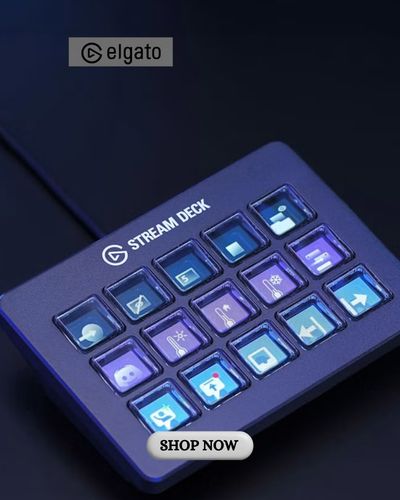
Elgato offers the Stream Deck family, featuring customisable controls that allow users to perform selected actions with a single press. Depending on the model, these devices include programmable LCD keys, dials, and other controls that can be configured for different workflows.
Stream Deck can be particularly useful for creators who regularly use broadcasting applications such as OBS Studio. Instead of navigating multiple menus during a live session, users can assign frequently needed commands to accessible controls.
For example, a gaming streamer might configure Elgato Stream Deck to switch scenes, mute a microphone, activate lighting presets, or open commonly used applications. This can reduce unnecessary interruptions and allow more attention to remain on the audience.
The device is not limited to streaming. Video editors, designers, office professionals, and online educators can create shortcuts for repetitive activities.
A productive setup begins with identifying the commands used most frequently. Organising these functions logically can make the controls easier to remember and help prevent accidental actions during live broadcasts.
2. Improve Audio Quality with Microphones and Mixing Tools
Clear audio is one of the most important elements of successful digital content. Viewers may tolerate minor visual imperfections, but distracting background noise, inconsistent volume, or unclear speech can make videos difficult to follow.
Elgato offers microphones and audio accessories through its Wave product family, including USB microphones, XLR equipment, microphone arms, and digital audio management tools.
USB microphones can provide a convenient starting point for beginners because they generally require fewer additional components than traditional XLR setups. More advanced creators may prefer separate microphones and audio interfaces for greater flexibility.
The Wave Link software from Elgato provides audio mixing and routing capabilities for compatible systems. It can help creators manage different sound sources, including microphones, applications, games, and communication software.
Microphone placement is equally important. Positioning a microphone at a suitable distance from the mouth can improve speech clarity and reduce the need for excessive volume adjustments.
A microphone arm may also help maintain a consistent recording position while keeping the desk organised.
Creators should test their recordings before purchasing additional accessories. Sometimes, adjusting microphone placement, reducing room echo, or changing software settings can produce a noticeable improvement without requiring an expensive upgrade.
3. Enhance Video Quality with Cameras and Professional Lighting
A well-presented video depends on more than camera resolution. Lighting, framing, background organisation, and camera settings all influence how professional a recording appears.
Elgato offers Facecam cameras designed for streaming, recording, and video communication. Its camera range includes different models suited to creators with varying requirements, including options supporting high-resolution video.
When choosing a camera, consider recording resolution, frame rate, field of view, autofocus behaviour where available, and compatibility with your computer.
Camera Hub software from Elgato allows users to manage supported camera settings and configure aspects of their video presentation. These adjustments can help create more consistent results across recording sessions.
Lighting often makes an even greater difference than purchasing a more expensive camera. A properly positioned light can reduce harsh shadows and make facial details easier to see.
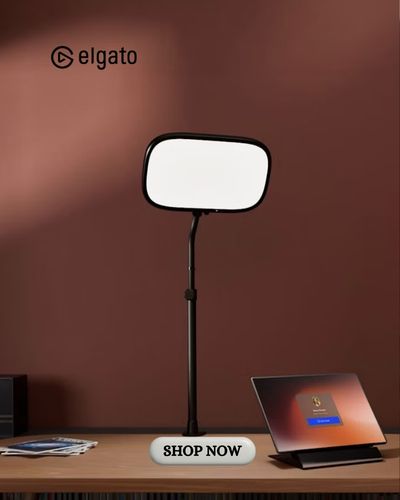
The Key Light family from Elgato includes lighting solutions designed for desks and content creation spaces. Selected models allow adjustments to brightness and colour temperature, helping users adapt illumination to different environments.
For a simple setup, position the main light slightly above eye level and experiment with the angle until facial shadows appear balanced.
Creators should also consider the background. A clean, intentional setting can help viewers focus on the speaker rather than distracting objects.
Combining thoughtful lighting with suitable camera settings can create a polished appearance without requiring a large professional studio.
4. Capture Gameplay and Produce Engaging Gaming Content
Gaming content remains a popular form of online entertainment, ranging from live multiplayer broadcasts to tutorials, reviews, highlights, and recorded walkthroughs.
Elgato offers game capture devices designed to help creators record or stream video from compatible gaming consoles, computers, and other sources. Its capture range includes products such as Game Capture Neo, HD60 X, and 4K X.
A capture device can be useful when recording gameplay from a console while managing broadcasting software on a separate computer. The appropriate model depends on the required resolution, frame rate, connectivity, and supported equipment.
Before purchasing a capture card from Elgato, check compatibility with your console, computer, monitor, and recording software. Technical requirements can differ considerably between devices.
Gaming creators should also consider how their recording settings affect computer performance and storage requirements. High-resolution footage can consume significant disk space, especially during longer sessions.
A well-organised workflow can make editing easier. Recording gameplay, microphone audio, and other sources in suitable configurations may provide more flexibility during post-production.
Beyond technical quality, engaging gaming content depends on storytelling, personality, and audience interaction. Equipment can support production, but it cannot replace entertaining commentary or thoughtful editing.
5. Make Video Presentations More Natural with Teleprompter Technology
Speaking confidently in front of a camera can be challenging, particularly when presenting detailed information or recording scripted videos. Looking repeatedly at notes may interrupt eye contact and make a presentation appear less natural.
Elgato offers Prompter devices featuring integrated displays that allow creators to view scripts and selected on-screen content while facing the camera.
This approach can be useful for educators, business professionals, YouTubers, interviewers, and people who regularly record structured presentations.
The Prompter range from Elgato includes different sizes for varying production environments. Selected models can display scripts, applications, or other windows, helping users manage information without constantly looking away from the camera.
A teleprompter works best when the script is written in natural, conversational language. Long sentences and complicated wording can make delivery sound mechanical, even when the equipment is functioning correctly.
Presenters should practise reading at a comfortable pace and use short paragraphs that allow natural pauses.
Teleprompter technology can also improve efficiency by reducing repeated takes caused by forgotten information. However, preparation and familiarity with the subject remain essential.
By combining clear scripts, appropriate camera positioning, and a relaxed speaking style, creators can produce more confident and engaging presentations.
6. Build a Creative Workspace That Supports Long-Term Growth
A successful content creation environment should be comfortable, organised, and adaptable. Rather than purchasing every available device immediately, creators can gradually improve their setup as their skills and requirements develop.
Elgato provides equipment across multiple categories, including audio, video, lighting, capture, control, and mounting accessories. This range allows users to explore different combinations based on their production needs.
Beginners may benefit from starting with a reliable microphone and suitable lighting before investing in more advanced equipment. Streamers who frequently manage complex broadcasts may prioritise programmable controls, while gaming creators may need a compatible capture device.
When exploring the product collections from Elgato, review technical specifications, operating-system requirements, available connections, and software compatibility. Not every accessory works with every device or computer configuration.
The brand also provides software downloads and resources for supported products, including Stream Deck, Wave Link, Camera Hub, and Control Center. These tools can help users configure equipment and maintain consistent production settings.
Creators interested in coordinated setups can explore selected product bundles. However, purchasing equipment individually may be more practical when only specific upgrades are required.
Workspace organisation also matters. Proper cable management, comfortable seating, suitable monitor positioning, and accessible controls can make longer recording sessions easier to manage.
Before investing in new equipment, identify the main limitation affecting your current content. If viewers struggle to hear your voice, audio improvements may offer greater value than a camera upgrade. If videos appear dark, lighting could be the more effective investment.
Ultimately, Elgato provides a range of creative tools for people producing videos, live streams, podcasts, gaming content, and professional presentations.
Building an effective studio is not about owning the largest collection of devices. It is about creating a reliable workflow that allows ideas to become engaging content. By choosing equipment thoughtfully, learning the available software, and improving production skills consistently, creators can develop a workspace that supports both creativity and long-term growth.